
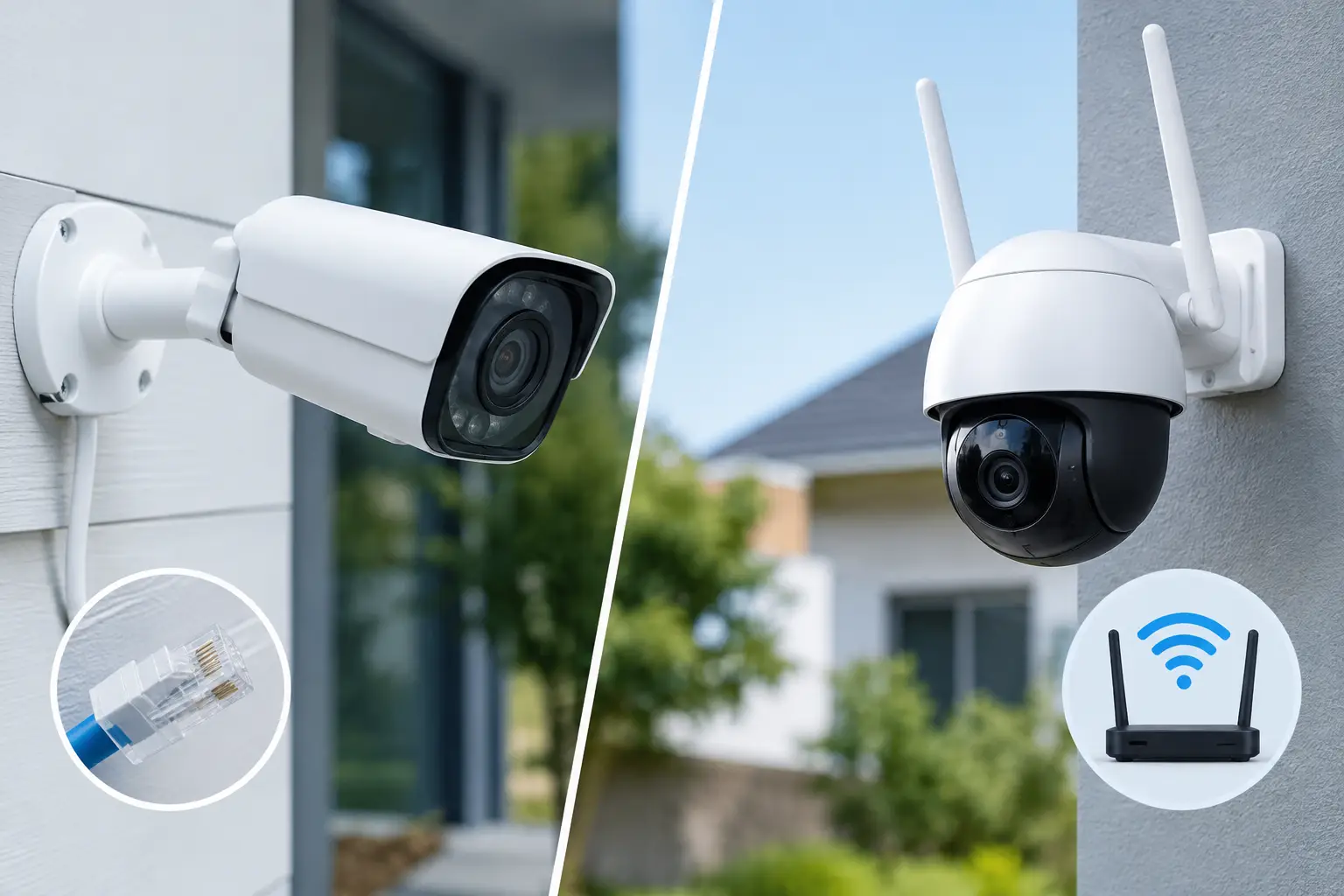
A camera overlooking a villa gate in 45°C heat, a parking entrance, or a hotel reception desk cannot be allowed to disappear when the wireless network is busy. That is the real question behind PoE versus WiFi cameras: not which option sounds more advanced, but which one will deliver dependable visibility in the specific places that matter most.
Both technologies can provide clear video, mobile viewing, alerts, and integration with a wider smart property system. The better choice depends on the building stage, camera locations, network design, and the level of reliability expected. For many premium homes and commercial projects, the strongest result is not an all-or-nothing decision. It is a carefully planned combination.
How PoE cameras work
PoE means Power over Ethernet. A single network cable carries both data and electrical power from a PoE switch or network video recorder to each camera. The camera is physically connected to the network, rather than relying on a wireless signal and a nearby power outlet.
This architecture is particularly valuable for fixed, security-critical locations: perimeter gates, driveways, entrance doors, parking areas, elevators, reception points, corridors, and service access. Because each camera has a wired connection, video transmission is typically more consistent and less vulnerable to congestion from household devices, guest use, or neighboring wireless networks.
A professional PoE installation also supports central equipment placement. The recorder, switch, storage, and network protection can be organized in a dedicated rack or technical cabinet instead of scattered around the property. The result is a cleaner finish and a system that is easier to inspect, support, and expand.
Why power over Ethernet suits permanent installations
The main advantage is reliability. A quality Ethernet cable provides a stable path for video and power, which is especially useful for higher-resolution cameras and continuous recording. When a camera needs to capture a face at a gate or a vehicle at an entrance, consistency matters more than the convenience of avoiding a cable.
PoE also simplifies backup power planning. If the central switch and recorder are connected to an uninterruptible power supply, the cameras can continue operating during a short power interruption without individual battery backups at every camera location.
There is a design benefit as well. With cable routes planned before finishes are completed, cameras can be placed according to sight lines and security needs, not according to the nearest outlet or strongest WiFi signal. This makes a visible difference in large villas, high-end apartments, offices, and hospitality properties.
How WiFi cameras work
WiFi cameras connect to the property’s wireless network and usually require local power through an outlet, adapter, or battery. They can be fast to deploy in areas where running new cabling would require opening walls, disturbing premium finishes, or creating an impractical route back to the network cabinet.
They are often a sensible option for a completed apartment, a temporary coverage requirement, an internal room, or a low-risk location where the wireless signal has been properly tested. A well-designed WiFi network with access points positioned throughout the property can support camera use effectively.
However, WiFi camera performance is tied to wireless conditions. Walls, metal structures, distance, interference, and the number of connected devices can affect signal quality. A camera may appear to work well during installation, then struggle during busy periods when residents, guests, televisions, phones, and smart devices compete for network capacity.
When WiFi is the practical choice
WiFi can be the right decision when construction is complete and cabling is not feasible without significant disruption. It is also useful for selected secondary viewpoints, such as a nursery, a storage room, a staff area, or a temporary outdoor location with appropriate weather protection and power access.
The key is not to treat wireless as cable-free security. Most WiFi cameras still need dependable power, and they still require careful network planning. Battery-powered models can be convenient, but they introduce maintenance, charging cycles, and possible gaps in continuous recording. They are rarely the first choice for an entrance gate or a critical commercial access point.
PoE versus WiFi cameras: the differences that affect daily use
Picture quality is often presented as the deciding factor, but both PoE and WiFi cameras are available in high resolution. The more meaningful difference is how reliably that quality reaches the recorder or app when the property is active.
PoE is generally the stronger option for continuous recording, multiple cameras, high-resolution streams, and long-term installations. It provides predictable bandwidth and lets the system operate independently of the household’s everyday wireless demands. It also makes troubleshooting more direct: technicians can test the cable, switch port, power delivery, and camera connection from a central point.
WiFi is more flexible during retrofit work and can reduce installation disruption in a finished space. Yet flexibility comes with dependency on signal strength, access point design, and network management. A premium WiFi system can reduce those concerns, but it cannot provide the same physical certainty as a correctly installed Ethernet cable.
Security deserves equal attention. Wired cameras are not automatically secure, and WiFi cameras are not automatically unsafe. Both require strong passwords, protected network settings, firmware maintenance, controlled remote access, and professional configuration. A separate network segment for security devices is often advisable, particularly in commercial and hospitality environments.
Choosing the right approach for each property type
For a new villa, major renovation, or development project, PoE should usually be the foundation of the CCTV design. Cables can be installed while ceilings and walls are open, allowing camera locations to be selected for coverage rather than convenience. This approach is ideal for boundary walls, gates, gardens, garages, main entrances, and shared family areas.
In a completed apartment or penthouse, the decision may be more selective. A PoE cable may still be practical through ceilings, joinery, or existing conduits for the entrance and key external views. WiFi may then serve a small number of internal locations where discrete retrofit installation is preferred. The objective is to protect important access points without unnecessary disturbance to the interior.
For offices, restaurants, retail stores, and hotels, PoE is commonly the better operational choice. These properties often need multiple cameras, longer recording retention, centralized management, and dependable coverage at doors, cash points, loading areas, and public spaces. WiFi cameras can complement the system in limited areas, but relying on them across a busy business environment can create avoidable support issues.
Plan the system, not just the cameras
The quality of a CCTV system is determined long before the first camera is mounted. Camera count alone says very little. A proper design considers the purpose of each view: identifying a visitor, monitoring a wide area, reading a vehicle plate, checking deliveries, or reviewing activity after an event.
It should also account for lighting at night, reflections from glass, mounting height, privacy boundaries, storage duration, internet resilience, and the way residents or staff will access footage. Cameras can be viewed through a phone, but the most effective system also provides sensible user permissions and simple day-to-day control.
For properties with smart locks, intercoms, gates, lighting, and access control, CCTV should not operate as a separate afterthought. A visitor call can bring up the relevant camera view. Gate events can be matched with video. Exterior lighting can support clearer nighttime footage. One intelligent system reduces the number of apps and makes security easier to manage.
Questions to ask before deciding
Before choosing between wired and wireless cameras, establish whether the location is security-critical, whether the building is under construction or fully finished, and whether continuous recording is required. Confirm the available cable routes, electrical points, wireless coverage, number of cameras, and the desired recording retention.
Also ask who will support the system after handover. A camera setup should include labeling, testing, user guidance, and clear ownership of passwords and network settings. The lowest initial installation cost can become expensive if cameras drop offline, recordings are unavailable, or no one can identify the source of a fault.
At Esmartech, the process begins with a site consultation and a CCTV design tailored to the space and operating needs. The installation, network configuration, testing, and handover are handled as one coordinated project, so security technology works naturally alongside the rest of the property.
The right camera choice is the one that still delivers a clear, accessible record when the moment matters. Start with the views that cannot fail, give those locations the most dependable connection available, and build the rest of the system around how the property is actually used.




Leave a comment