
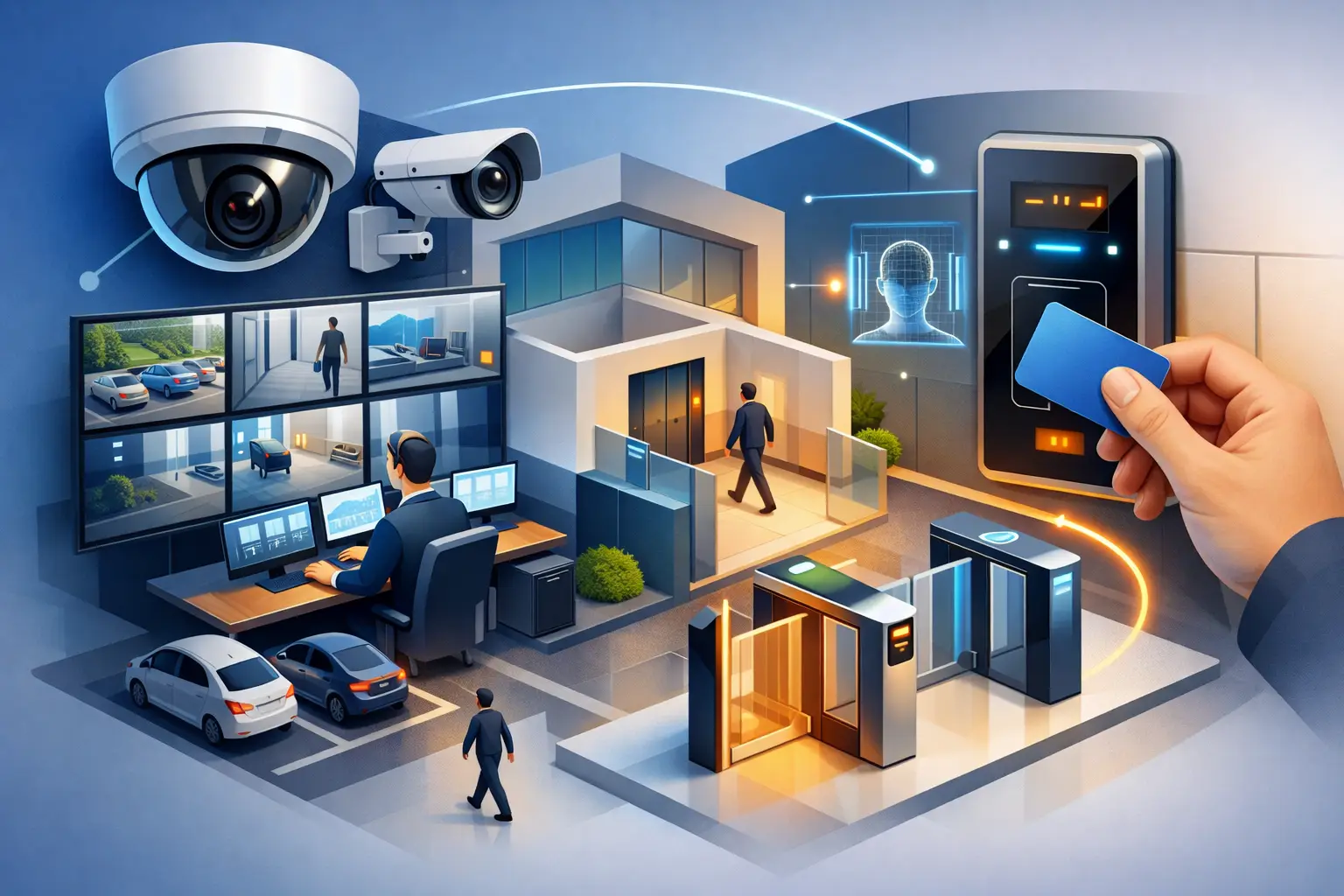
A door event without video leaves a question mark: Who entered, was the credential valid, and did the person go where they were authorized to go? CCTV and access control integration answers those questions from one intelligent system. For villas, apartments, offices, hotels, and retail spaces, it brings entry records and visual verification together so security decisions are faster, clearer, and easier to manage.
The value is not simply having more technology. It is designing cameras, readers, locks, networks, and software around how a property is actually used. A family may need controlled gate access and a clear record of service visits. A hotel needs to protect guest areas without making arrival feel complicated. An office may need different access rights for staff, visitors, contractors, and restricted rooms. The system should support those routines without adding daily friction.
What CCTV and Access Control Integration Does
Access control determines who can enter a door, gate, elevator floor, parking area, or secured room. Credentials can include cards, key fobs, PIN codes, mobile access, biometric readers, or smart locks. CCTV records and displays the activity around those locations.
When the two systems are integrated, an access event can automatically call up the related camera view. If a card is used at a side entrance at 10:18 p.m., the property manager can see the corresponding video clip alongside the door transaction. If a door is forced open or held open beyond its permitted time, cameras can be prompted to record, notify the right person, or display the event in the security interface.
This connection is especially useful when reviewing an incident. Instead of searching through hours of footage and separately exporting access logs, users can begin with a specific event and verify what happened in context. It also helps teams distinguish between a valid entry, a tailgating attempt, a delivery, and a potential security issue.
Security That Fits the Property
A well-designed system starts with risk and workflow, not a camera count. A luxury villa, for example, may need coverage at the pedestrian gate, vehicle entrance, perimeter, main entry, pool access, and staff areas. Access control can limit who enters through service gates or selected internal rooms, while intercom verification gives residents another layer of control before releasing a visitor.
For an apartment building or mixed-use development, the priorities are different. Managers may need controlled access at common entrances, parking barriers, amenity spaces, electrical rooms, and management offices. Camera placement should support those controlled points while respecting privacy in residential areas.
Commercial and hospitality properties require more detailed permission structures. A restaurant can restrict back-of-house access while allowing delivery staff through a managed entry point. Offices can issue timed credentials to contractors and revoke access when work is complete. Hotels can connect staff-only doors, service corridors, loading areas, and critical plant rooms to a centrally managed security plan.
There is no single layout that fits every site. More cameras do not automatically mean better coverage, and the most advanced reader is not always the right answer. The strongest results come from matching technology to the building’s traffic flow, operating hours, privacy expectations, and level of risk.
A clearer response to door alarms
Door alarms are common, but they can become background noise if staff cannot quickly tell what caused them. Integrated video changes the response. A held-open door could be a cleaner moving supplies, an employee propping a door during a delivery, or an unauthorized attempt to enter. Viewing the associated footage helps security staff respond based on facts rather than assumptions.
This is also valuable for remote property owners. A phone notification is more useful when it includes the ability to view the relevant camera and confirm whether action is needed. For high-value homes and vacant properties, that visibility can reduce unnecessary callouts while allowing genuine concerns to be escalated promptly.
The Components That Need to Work Together
Successful integration depends on more than choosing compatible cameras and card readers. The system needs dependable door hardware, appropriate power provision, network capacity, secure configuration, and a platform that can present information clearly. A weak link at any point can affect the overall experience.
Door design matters. External gates and heavy doors may require different locking hardware from internal office doors. Fire and life-safety requirements must be addressed so doors behave correctly during emergencies. Reader placement should be convenient for users while being protected from weather, tampering, and accidental damage.
Camera design also needs careful attention. A camera facing an entry point should capture useful identification detail under the actual lighting conditions at that location. Backlighting from glass doors, night-time vehicle headlights, and bright outdoor sun can all affect image quality. In some cases, adding a second angle is more effective than relying on one wide camera view.
The network and storage plan should be sized for the number of cameras, image resolution, retention period, and remote viewing needs. High-resolution video is valuable, but it requires appropriate bandwidth and storage. A professional design balances image quality, retention expectations, budget, and the practical speed of reviewing footage.
Choosing the Right Level of Control
For a private residence, a straightforward setup may combine smart locks, gate access, video intercom, selected perimeter cameras, and app-based alerts. Residents can grant temporary access to household staff or visitors, check entry activity remotely, and monitor key areas without operating a complicated security room.
For larger villas, premium apartments, and commercial sites, centralized management becomes more important. Administrators may need user groups, access schedules, audit trails, credential expiration, and multiple-site control. A developer or hotel operator may also need standardized systems across properties while retaining different permissions at each location.
Mobile credentials offer convenience, particularly where users do not want to carry cards or fobs. However, physical credentials can still be the better choice for some staff groups, shared facilities, or sites with frequent temporary users. Biometrics can provide additional assurance in sensitive areas, but they require thoughtful consideration of privacy, user acceptance, and local regulations.
The objective is not to use every available feature. It is to create a system that the property team and residents will use correctly every day.
Planning CCTV and Access Control Integration
A site consultation should identify the entrances that matter most, the paths people take through the property, and the events that require an immediate response. It should also assess existing wiring, network equipment, door conditions, and opportunities to coordinate with intercoms, smart locks, alarms, lighting, or a broader automation platform.
From there, the project should move through a clear sequence: consultation, quotation and system design, installation and testing, then handover. During design, each camera and reader should have a specific purpose. During installation, visible devices should be positioned cleanly and cable routes should be planned to preserve the finish of the property. Testing should cover normal entry, denied access, door alarms, night video, remote viewing, user permissions, and notification behavior.
At handover, users need more than login details. They should understand how to add or remove credentials, review events, respond to alerts, and contact support. For commercial properties, it is wise to define who owns administration after installation so permissions remain accurate as staff and tenants change.
Esmartech designs integrated security and automation systems around these operational details, managing the process from site assessment through installation, programming, testing, and user guidance.
Questions to Ask Before You Approve a System
Before selecting a solution, ask how long video needs to be retained, who needs access to live and recorded footage, and which doors require an audit trail. Decide whether the system must work across multiple buildings, whether remote access is needed, and what happens if internet service is interrupted.
It is also worth discussing future expansion. A property may begin with perimeter cameras and two controlled entrances, then later add a guest gate, staff quarters, parking access, or additional offices. Choosing an architecture that can grow avoids an unnecessary replacement project later.
Cybersecurity deserves equal attention. Cameras and access controllers are networked devices, so they should be configured with protected credentials, appropriate user roles, secure remote access, and regular software maintenance. Convenience should not mean giving every user full control of the system.
A thoughtfully integrated setup gives a property more than surveillance and locks. It gives owners and operators a practical view of how people move through the space, the confidence to verify events quickly, and a security experience that feels considered rather than intrusive. The right design should make the building easier to protect while allowing the people inside it to move through their day with confidence.
Leave a comment